In development
OD Studio for iPhone and iPad
A companion app is in development. It will be shown here once it can be shown working — until then, no screens and no promises about what it will do.
Album
PLEROMA
ODYN · 19 tracks
Order of Matter
Track 1 of 19
Plays only when you press play. It steps aside while you try something in OD Studio, then comes back.
OD Studio for Mac · in development
OD Studio is a Mac app that understands music files the way musicians do. Your projects, takes, stems, MIDI ideas and presets in one library: filed as they arrive, heard in a moment, in time with your DAW — and every project readable without opening it.
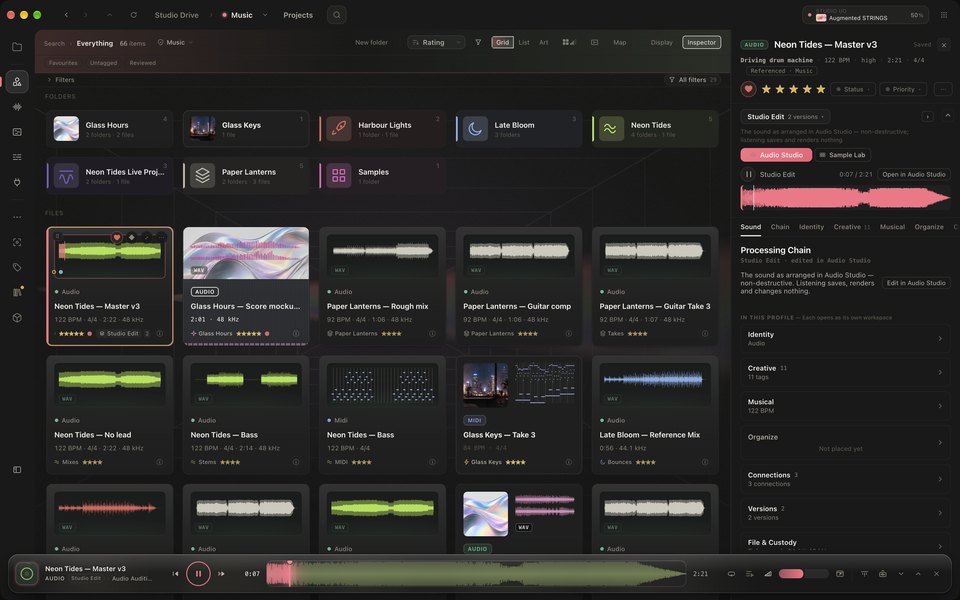
OD Studio for Mac A demo library in the real app: the library, a track’s Profile, and the Dock playing it.
00Before OD Studio
Sessions on one drive, bounces in Downloads, stems in a folder you named in a hurry. OD Studio reads the folders you choose and gives every file a place where you can find it again — without moving a thing.
Illustration: nine files from different places — Downloads, the Desktop, an external drive, iCloud Drive and old folders — gathered into one Studio Drive list.
01Automation
Teach a folder once. OD Studio reads what each new file is — where it came from, its client code, its tempo, its key — and files it the way you would, every time. It asks before it acts if you want it to, explains every decision, and never guesses a fact it can’t read.
Bounces from Logic are filed by year. Everything else is left where it landed.
Files where it arrives from Logic and it ends .wav or .aif and OD Studio does not already have a copy of it in “Bounces”: move it to Exports / [Year] — waiting for your yes before anything touches the file.
OD Studio prepares each change and waits for your yes.1 waits for your yes
All of these must be true
Steps run in this order: descriptions first, then anything that touches the file, so it never moves wearing the wrong description.
02Studio Drive
Studio Drive is your real folders, shown the way a musician thinks about them — songs with artwork, stems as waveforms, takes with their tempo and rating. Search reaches all of it at once.
In OD Studio, a producer opens their music folder, steps into a song’s stems, opens one stem’s Profile and plays it, then looks through its creative tags and musical details. The recording has no sound.
03Versions and the Dock
Select anything and the Dock has it loaded. Every saved version is a new file beside the original — the original is never overwritten — and comparing two is one gesture, at the same moment in the music.
The Versions panel of a track’s Profile: each saved version is selected and played in turn, then the view returns to the Sound tab. The recording has no sound.
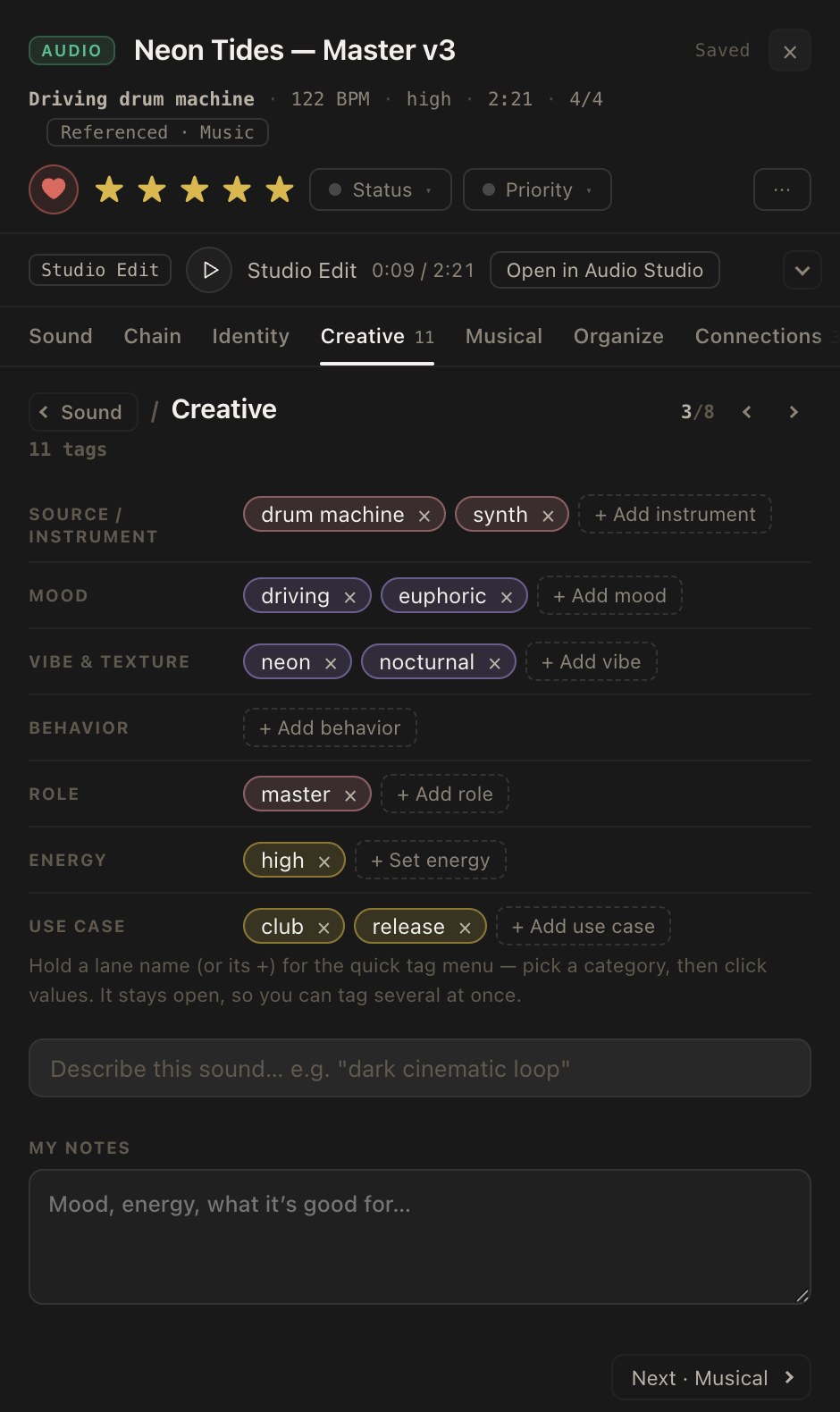
Press play in the Dock, then pick another version — or ⇄ Compare to hear the other one at the same moment.
Versions
OriginalMix · 96 BPM · D minor · 0:42
The mix as it was bounced. OD Studio never overwrites it.
—The Dock
The Dock stays at the bottom of OD Studio wherever you are. Its face moves with the music — the sound’s energy for audio, the chord on a twelve-tone wheel for MIDI. It loops a range you choose, and opens into a full timeline when you want to look closer.

04MIDI → Instrument → Sound
A MIDI idea is silent until something plays it. Studio I/O plays it through any Audio Unit instrument on your Mac, with its presets and effects — so you hear the sketch as the finished thing could sound, without opening a DAW. These are the founder’s own chord sketches.
A MIDI file plays in OD Studio’s piano roll: the playhead crosses the notes while the Dock at the bottom follows the same position. The recording has no sound.
Press play, then change the instrument while it plays. Watch the notes stay the same — and the sound change.
The notes
Reading…unchanged
The instrument
The sound
Press play, then change the instrument while it plays.
The founder’s own MIDI, played by browser instruments made for this page. In OD Studio, the lens is any Audio Unit instrument on your Mac. Open Studio I/O →
05DAW project → connected studio
Logic Pro, FL Studio and Ableton Live stay where they are. OD Studio reads the project without opening it, remembers every save, follows the session while it plays, places the sound you just found on the track you’re working on — and files whatever the project exports.
01 / 06
Reads it
24 tracks · 31 plug-ins · 96 BPM · 4/4
Every track, instrument and effect chain, read from the file — with Logic Pro closed.
Logic Pro, FL Studio, Ableton Live · founder-accepted
♪Music by OD
The music on this site is ODYN’s album PLEROMA — 19 tracks, played one after another while you look around, stepping aside whenever you try something in OD Studio.
Track 1 of 19 · Order of Matter
06Beyond the Mac
OD Studio is being built for the Mac, where your projects and sessions live. Everything on this page is the Mac app. Windows is part of the long-term plan — not scheduled, and no Windows version is being built yet.
In development
A companion app is in development. It will be shown here once it can be shown working — until then, no screens and no promises about what it will do.
In early development
A separate app from Made by OD, exploring how musical ideas can be captured, understood and developed. Early, and presented as such.
07Go deeper
Each room holds working demonstrations of one part of OD Studio. Or press ⌘K anywhere to find anything.
08Interactive preview
The preview is a small, working recreation of OD Studio in your browser: Studio Drive, Profiles, the Dock, Versions, Audio Studio, MIDI and a project’s anatomy — with a fictional library of three pieces of music. Nothing to install, no account, and nothing leaves your browser.
09Where it is today
OD Studio is in active development on the Mac. This is what works today, what is being refined, and what is still being built.
Built, and in real use by its maker.
Built, with known gaps being closed.
Being built. Not shown until it works.
Availability
Being built for Macs with Apple silicon. Not yet available.
No release date or price has been announced. When there is news, it will be here first.