DYour DAW, connected

Keep your DAW. Give it a studio that understands it.

OD Studio doesn’t replace Logic Pro, FL Studio or Ableton Live. It works beside them — in time with the session while it plays, carrying the sound you just found onto the track you’re working on, and reading the project itself while the DAW is closed.

  1. 01 DAW Sync
  2. 02 Presets → your DAW
  3. 03 Project Intelligence
  4. 04 What each DAW supports
  5. 05 Where OD Studio runs

01DAW Sync

Two transports. One beat.

Press play in your DAW and OD Studio is already listening — its tempo, its bar, its cycle. Audition anything from your library and it enters on the next beat, at the session’s tempo, and stops the instant the DAW does. Choose a DAW, press play, then press one of the founder’s compositions. Then switch sync off and hear what working without it sounds like.

Logic Pro simulatedNight Sketch 14
1 . 1 . 196 BPM
12345678910111213141516

Not any DAW’s interface — a stand-in for its transport. Press the ruler to jump.

DAW SyncOnConnected to Logic Pro — waiting for playback96 BPM4/4

The MIDI collection — press one

  • Reading the collection…

Details

Project
Night Sketch 14
Tempo
96 BPM
Time signature
4/4
Transport
Stopped — bar 1
Beat
Waiting for playback
Integration
Connected — nothing added to your project

Click any sound — it starts on the next beat, locked to the DAW. Press play in the DAW first, or arm a sound and then press play.

How OD Studio reaches Logic Pro

Logic sends its timecode and transport to a control surface OD Studio provides — Logic finds it by itself — and OD Studio reads the tempo, the meter and the project’s name from Logic’s window.

  1. DAW Connections › Logic Pro › Set Up
  2. System Settings › Privacy & Security › Accessibility — turn on “ods-logic-sync-agent”
  3. In Studio I/O, switch DAW Sync on

Founder-accepted · in production. Timing: a constant 18.3 ms correction for the timecode’s lateness. Nothing is added to your projects.

  • Follows the tempoWorks today
  • Follows tempo changesWorks today
  • Starts and stops with the DAWWorks today
  • Knows the bar and beatWorks today
  • Follows jumpsWorks today
  • Loop / cycleWorks todayWraps followed; the cycle is read as on or off.
  • Knows the time signatureWorks today
  • Follows time-signature changesWorks today
  • Knows the project’s nameWorks today
  • Knows the project’s keyNot supportedNot read from any DAW.
  • Starts or stops the DAW from OD StudioPlannedTested, not offered yet. Sync follows the DAW and never changes its tempo, meter or transport.
  • Drag a file onto a trackWorks · provisionalA plain file drag; not yet checked by an OD Studio test.

A simulation in your browser, with this site’s instruments: nothing here connects to a DAW on your computer. In OD Studio, the DAW keeps the time — OD Studio follows it and never changes its tempo, meter or transport.

02Plug-ins, presets, Use in DAW

Your sounds deserve more than a folder.

Presets live in a dozen folders, in formats that don’t know each other, under names that say nothing about how they sound. OD Studio reads them all into one place, sorted by what they are and linked to the plug-in that plays them. Find one, hear it, and send it straight to the track you’re working on — OD Studio places it in the open project and checks it arrived.

Before — your Mac13 presets · 12 folders · 5 formats · nothing connects them

~/Library/Audio/Presets/Harbour Instruments/Tidewater/Pads

  • Warm Bloom.aupreset
  • Slow Tide.aupreset

~/Documents/Harbour Instruments/Collected

  • Glass Bell.fxp

~/Library/Audio/Presets/Paper Moon Audio/Glasshouse Keys

  • Felt Upright.aupreset

~/Music/Audio Music Apps/Plug-In Settings/Glasshouse Keys

  • Night Tines.aupreset

~/Music/Audio Music Apps/Plug-In Settings/Glasshouse Keys/Organs

  • Chapel Organ.aupreset

~/Documents/Harbour Instruments/Velvet Strings/Ensembles

  • Paper Strings.vstpreset

~/Library/Audio/Presets/Harbour Instruments/Tidewater/Plucks

  • Round Pluck.aupreset

~/Library/Audio/Presets/Low Tide Labs/Sub Foundry/Bass

  • Harbour Sub.aupreset

~/Documents/Harbour Instruments/NKS/Leads

  • Drift Lead.nksf

~/Library/Audio/Presets/Northline DSP/Long Hall

  • Cathedral, Far.aupreset

~/Music/Audio Music Apps/Plug-In Settings/Tape Echo

  • Quarter Echo.aupreset

~/Music/Audio Music Apps/Channel Strip Settings

  • Night Vocal Chain.cst

03Project Intelligence

Your projects have more to say than their filenames.

Which reverb was on the vocal three saves ago? Which samples will be missing at the session? What did you change last night? OD Studio reads the project file itself — read-only, offline, with the DAW closed — and shows each part of it plainly.

Logic ProLate Bloom.logicxLogic Pro project · 412 MB package · Read offline · Logic Pro was not opened

What it is, at a glance

Tempo90 BPM
KeyA minor
Signature4/4
Sample rate48 kHz
Tracks9
Saves3, and Logic’s own backups
Audio files23 used · 4 unused · 1 missing
Bounces nearby2

Read-only — OD Studio never changes the Logic project.

What ODS could not vouch for is said, item by item — a lit region is where the project places it, not proof you can hear it in the mix.

A fictional Logic Pro project, described by this page with the kinds of facts OD Studio reads and the words its Project Anatomy uses. It was not saved by Logic Pro.

Real OD Studio The same reading in the app — a demonstration Live Set, read by OD Studio for Mac.

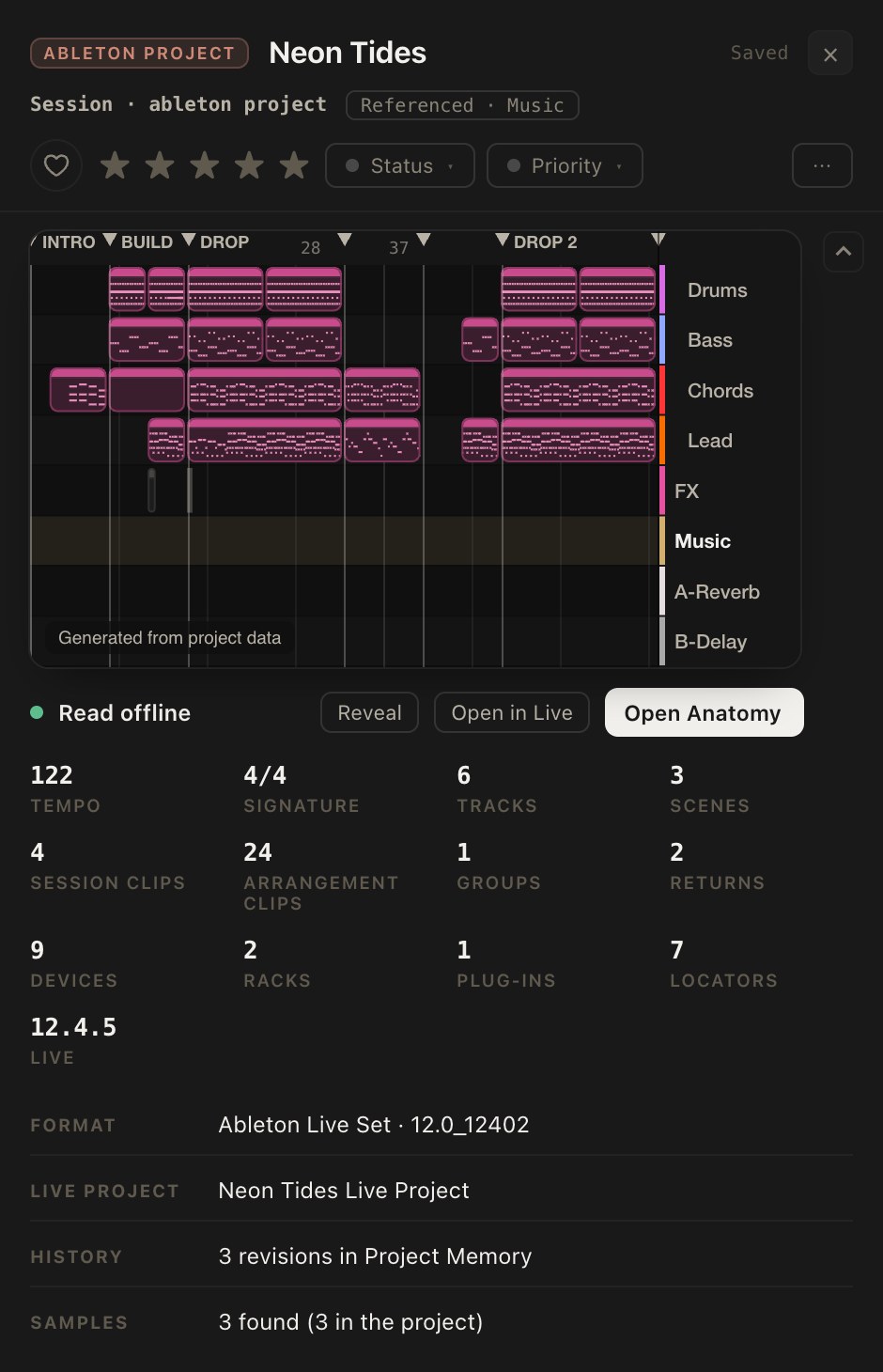
The Profile of an Ableton Live Set: a small picture of its arrangement, then counts of tracks, scenes and clips, its format and its samples.
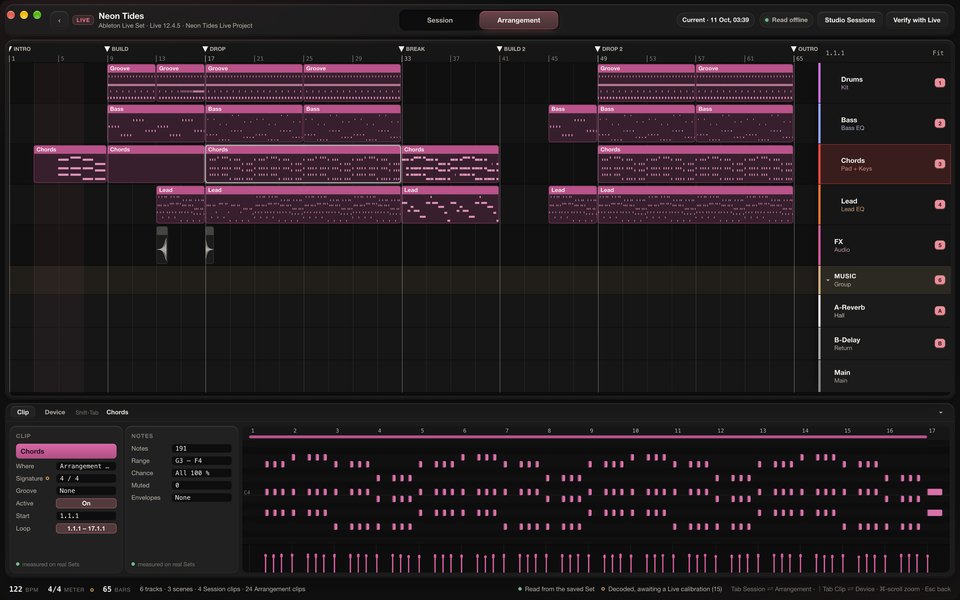
Project Anatomy of an Ableton Live Set: an arrangement of pink clips across tracks with section markers, and below it the notes of the selected Chords clip.
OD Studio for MacOD Studio reads a project’s structure without opening your DAW. Shown: a demonstration Live Set.Shown: a demonstration Live Set generated for this site — not a project saved by Ableton Live.

OD Studio opens the profile of a demonstration Ableton Live Set, then its arrangement anatomy; selecting clips shows the notes inside them. Ableton Live is not running. The recording has no sound.

OD Studio for Mac · recordingA demonstration Live Set, opened without Ableton Live.Shown: a demonstration Live Set generated for this site — not a project saved by Ableton Live.

04What each DAW supports

Three DAWs. Every capability, plainly.

Support is not the same for every DAW, so here it is capability by capability — what works today, what is being refined, and what is still to come.

Reading projects — without opening the DAW
CapabilityLogic ProAbleton LiveFL Studio
Recognise and read the projectThe file opened on its own, offline and read-only.WorkingWorkingWorking
Project AnatomyTracks, instruments and effect chains; regions, clips and notes; tempo and markers.WorkingWorkingSession and Arrangement, devices and racksWorkingPlaylist, Channel Rack, Piano Roll, Mixer — automation clips not read yet
Save historyWhat changed from one save to the next.Workingincl. Logic’s own backupsWorkingfrom Live’s backupsWorkingsaved, earlier and unsaved work kept apart
Samples and plug-ins a project needsWhat is on this Mac, and what is missing.WorkingWorkingplug-ins identified by formatWorkingchecked against FL Studio’s own plug-in list
Reference MixThe project’s finished mix, played with the arrangement.WorkingNot availableNot available
Working alongside the DAW
CapabilityLogic ProAbleton LiveFL Studio
Follow tempo and transportPreviews start on the next beat, at the DAW’s tempo, while the DAW plays.WorkingBeing refinedBeing refinedmetre changes and loop following planned
Follow the loopThe DAW’s cycle or loop, followed in OD Studio.Being refinedcycle on / offBeing refinedPlanned
Control the DAW’s transportPlay and stop the DAW from OD Studio.Being refinedPlannedPlanned
Place a plug-in or preset in the DAWChoose a sound in OD Studio; it arrives on a track in the open project.WorkingWorkingBeing refined
Projects into Studio Sessions
CapabilityLogic ProAbleton LiveFL Studio
Projects into Studio SessionsTracks, notes, routing and audio, referenced in place — the project itself never changed.In developmentfirst version builtIn developmentIn development

More DAWs are planned. OD Studio already recognises project files from other DAWs in your library and keeps them safe; reading them is on the plan, with no dates announced.

Working built, and accepted in real use ·Being refined usable, still being finished ·In development not ready to use ·Planned not built yet

05Where OD Studio runs

Made for the Mac. Built to travel.

The product

OD Studio for Mac

The primary product, being built for Macs with Apple silicon. It hosts Audio Unit instruments and effects, and keeps a catalogue of every plug-in on your Mac whatever its format.

In development · not yet available · no release date or price

In development

iPhone and iPad

A companion for your library away from the Mac. It will be shown here when it can be shown working.

The wider picture →

Future

Windows

Part of OD Studio’s long-term plan, together with VST3 plug-ins. It is not scheduled and no Windows version is being built yet — OD Studio is designed so that it can follow.

No date announced