About
Why OD Studio exists.
Making music leaves a trail. Sessions on one drive, bounces in Downloads, stems in a folder named in a hurry, a MIDI idea from three years ago that was better than you remember. The music gets made; what it was made from scatters.
OD Studio is a Mac app that brings that trail back together. It reads the folders you choose and gives every file a Profile; it plays anything the moment you select it; it keeps versions beside originals instead of over them; and it can look inside Logic Pro, Ableton Live and FL Studio projects to show how they were made.
The aim is simple: the work you have already made should become easier to find, hear and use again — not harder, the more of it there is.
How it is being built
Four commitments.
- 01
Your files stay where you put them.
OD Studio reads the folders you choose. A linked folder starts as watch-only, nothing moves until you allow it, and what OD Studio knows about a file — tags, ratings, notes — is kept beside it, not written into it.
- 02
The original is protected.
Edits in Audio Studio are kept as instructions, and every saved version is a new file beside the original. The source is only rewritten if you choose to replace it — and that can be undone.
- 03
It reads, rather than guesses.
A MIDI file is read exactly as written. A project’s anatomy comes from the project itself. Where OD Studio is working something out — like a tempo — it is being built to show how sure it is and let you decide.
- 04
Shown as it is.
This site says what works today, what is being refined and what is still being built — and the interactive preview only does what OD Studio does.
About the pictures on this site.
There are three kinds, and each is labelled.
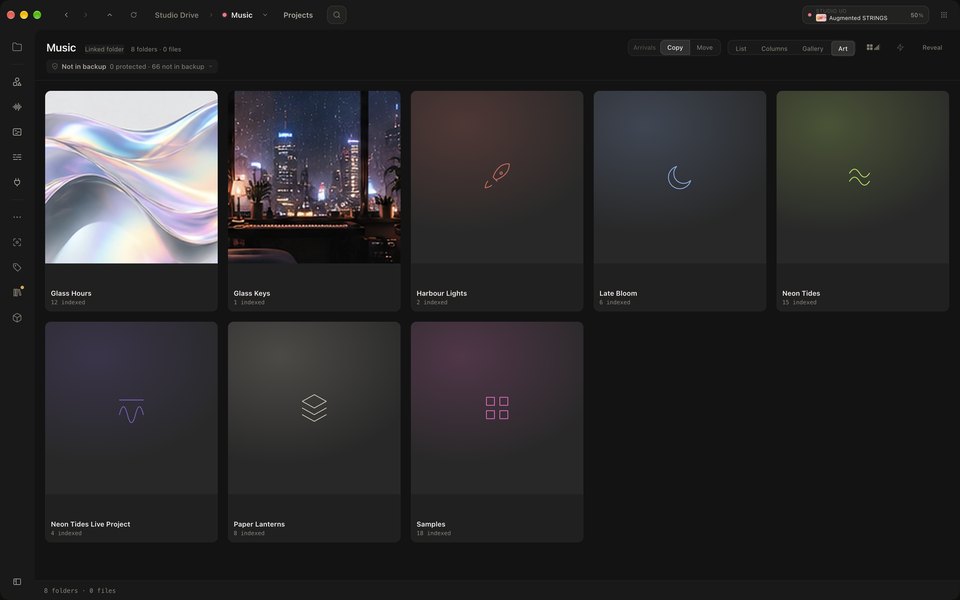
OD Studio for Mac marks a still or a recording of the real app: a developer build, not yet released, running a demo library made for this site — never anyone’s real music — in the appearance its maker has chosen for it. Nothing inside the window is retouched. The recordings are silent; the app played into a silent output while they were made. The Ableton Live Set shown was generated for this site to demonstrate Project Intelligence; it was not saved by Ableton Live.
Interactive preview marks the recreation you can use: OD Studio rebuilt for the web from the app’s own design, playing a fictional library of music written for it. It works the way OD Studio works, but it is not the desktop app, and it does not contain OD Studio’s audio engine.
Demonstrations — the automations, the naming, the instrument stage, the loudness view — run OD Studio’s rules or measurements in your browser, on fictional files: nothing touches your own files, and the instruments are original synthesis, not plug-ins. Where something is a stand-in (a pretend DAW, fictional plug-ins), it says so.
Made by OD.
OD Studio is an independent project, made in Australia — alongside Music Mind, a separate and earlier-stage project for musical ideas.